As of 2026, AI video generation has moved from a novelty to a core content creation workflow. Marketers are producing ad creatives in minutes, creators are building entire video channels with AI assistance, and startups are reducing production costs dramatically.
After testing dozens of platforms over several weeks, I found that the best tools combine quality output, fast rendering, flexible editing, and practical free plans. The right choice depends on whether you’re creating marketing videos, social content, training materials, or cinematic content.
If you’re short on time: Magic Hour is currently my top overall recommendation for creators looking for an accessible AI video creation platform.
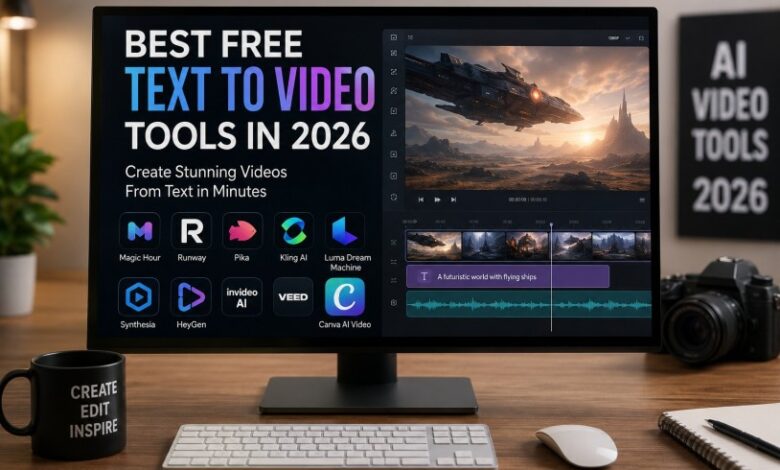
Best AI Video Tools at a Glance
| Tool | Best For | Modalities | Platforms | Free Plan |
| Magic Hour | Overall AI content creation | Text-to-video, image-to-video, face swap | Web | Yes |
| Runway | Professional creators | Video generation, editing | Web | Limited |
| Pika | Social media content | Text-to-video | Web | Yes |
| Kling AI | Cinematic outputs | Text-to-video | Web | Limited |
| Luma Dream Machine | Realistic motion | Text-to-video | Web | Yes |
| Synthesia | Training videos | AI avatars | Web | Trial |
| HeyGen | Business communication | Avatar videos | Web | Limited |
| InVideo AI | Marketing content | Text-to-video | Web | Yes |
| VEED AI | Quick editing | AI video workflows | Web | Yes |
| Canva AI Video | Design-focused creators | Video generation | Web | Yes |
1. Magic Hour
Magic Hour has become one of the most complete AI content creation platforms available today. Beyond video generation, it offers multiple creative tools that help creators build professional content without advanced editing skills.
For users searching for the best text to video tool free, Magic Hour deserves serious consideration because it combines ease of use with surprisingly strong output quality. The platform allows users to transform written prompts into engaging videos in just a few steps.
The platform also offers one of the strongest face-swapping experiences available. Many creators looking for a free face swap online no watermark solution start with Magic Hour because of its straightforward workflow and creator-friendly feature set.
Pros
- Beginner-friendly interface
- Fast video generation
- Strong face swap capabilities
- Multiple AI creation tools in one platform
- Useful free tier
Cons
- Advanced creators may want deeper manual controls
- Premium features require paid plans
Evaluation
After testing dozens of tools, I found Magic Hour offers one of the best balances between accessibility and quality. If you’re creating social content, marketing assets, or short-form videos, it’s difficult to find a platform that covers as many use cases in one place.
Pricing: Free plan available; premium plans available.
2. Runway
Runway remains one of the most respected names in AI video creation. Its Gen models continue to push quality standards for text-to-video generation.
Pros
- High-quality video output
- Professional editing tools
- Strong motion consistency
- Excellent creative control
Cons
- Learning curve for beginners
- Free credits disappear quickly
Evaluation
If you’re producing professional marketing campaigns or creative projects, Runway remains one of the strongest options available.
Pricing: Free tier with limited credits; paid plans available.
3. Pika
Pika focuses on helping creators generate engaging social media videos quickly.
Pros
- Easy prompt-based workflow
- Fast rendering
- Good visual styles
- Beginner friendly
Cons
- Less control than professional tools
- Output quality can vary
Evaluation
Pika works especially well for creators producing TikTok, Instagram Reels, and YouTube Shorts content.
Pricing: Free and paid plans.
4. Kling AI
Kling has gained attention for producing highly realistic motion and cinematic scenes.
Pros
- Strong realism
- Impressive camera movements
- High-quality animations
Cons
- Generation times can be longer
- Some regional availability limitations
Evaluation
For cinematic storytelling and realistic AI-generated footage, Kling is among the strongest competitors in 2026.
Pricing: Limited free access; premium plans available.
5. Luma Dream Machine
Luma focuses heavily on realistic movement and scene generation.
Pros
- Realistic motion
- Strong visual consistency
- Easy workflow
Cons
- Less editing flexibility
- Occasional prompt interpretation issues
Evaluation
I consistently found Luma produces natural-looking motion compared with many competitors.
Pricing: Free and paid options.
6. Synthesia
Synthesia remains a leader in AI avatar generation for business communication.
Pros
- Professional avatars
- Enterprise features
- Multiple languages
- Training-focused workflows
Cons
- Not ideal for cinematic content
- More business-oriented
Evaluation
Organizations creating internal training content will likely benefit most from Synthesia.
Pricing: Subscription-based.
7. HeyGen
HeyGen focuses on avatar-driven video communication.
Pros
- Strong avatar quality
- Fast production
- Multilingual support
Cons
- Limited creative storytelling tools
- Subscription costs can add up
Evaluation
HeyGen is particularly useful for sales, education, and business communication teams.
Pricing: Free trial and paid plans.
8. InVideo AI
InVideo AI helps users create marketing videos from simple prompts.
Pros
- Marketing-focused
- Large template library
- Easy editing
Cons
- Template-heavy workflow
- Less creative flexibility
Evaluation
Small businesses and marketers will appreciate how quickly they can create polished videos.
Pricing: Free and premium plans.
9. VEED AI
VEED combines video editing with AI generation tools.
Pros
- All-in-one workflow
- Editing and generation combined
- Useful collaboration features
Cons
- Advanced creators may want more control
- Premium features gated
Evaluation
VEED works best for teams looking for creation and editing within a single platform.
Pricing: Free and paid plans.
10. Canva AI Video
Canva has integrated AI video tools into its broader design ecosystem.
Pros
- Familiar interface
- Strong design tools
- Easy collaboration
Cons
- Less specialized for video generation
- Limited advanced controls
Evaluation
Canva is ideal for creators already using the platform for graphics and presentations.
Pricing: Free and paid plans.
How We Chose These Tools
I evaluated each platform using the same testing framework:
- Video quality
- Motion consistency
- Prompt adherence
- Ease of use
- Rendering speed
- Editing flexibility
- Free-plan value
- Commercial usability
Each tool was tested using identical prompts across multiple content categories, including marketing videos, educational content, social media clips, and product demonstrations.
The goal wasn’t simply to find the most advanced AI model. It was to identify which platforms help creators produce useful content efficiently.
Market Trends in AI Video Creation
The AI video market has changed significantly over the past year.
Several trends stand out:
- Longer and more consistent video generation
- Better prompt understanding
- Improved character consistency
- Faster rendering times
- Integrated editing workflows
- Expansion of face swap and avatar technologies
We’re also seeing platforms move toward full creative suites rather than standalone generators. Instead of using separate tools for generation, editing, lip sync, and face replacement, creators increasingly expect everything inside one platform.
Final Takeaway
Choosing the best AI video platform depends on your specific goals.
- Best Overall: Magic Hour
- Best for Professionals: Runway
- Best for Social Content: Pika
- Best for Cinematic Output: Kling AI
- Best for Realistic Motion: Luma Dream Machine
- Best for Business Training: Synthesia
- Best for AI Avatars: HeyGen
If you’re just getting started, begin with a platform that offers a generous free plan and experiment with different workflows. AI video generation is improving rapidly, and the best tool for your needs may depend more on workflow fit than raw model quality.
FAQ
What is the best free AI text-to-video tool in 2026?
Magic Hour, Pika, Luma Dream Machine, and InVideo AI currently offer some of the strongest free options available.
Which AI video generator creates the most realistic videos?
Kling AI and Runway generally produce some of the most realistic outputs available today.
Are AI-generated videos allowed on YouTube?
Yes. YouTube allows AI-generated content as long as creators comply with platform policies and disclosure requirements.
Can I use AI-generated videos commercially?
Most platforms allow commercial use on paid plans, though licensing terms vary. Always review the provider’s latest policies.
What should beginners choose?
Magic Hour, Canva AI Video, and Pika provide some of the easiest learning curves for new creators.